How to Fix E1, E2 & E3 Errors on ProForm Treadmills
A treadmill error code can bring your workout to an unexpected stop, leaving you wondering what went wrong and how to get your machine running again. If your ProForm treadmill displays an E1, E2, or E3 error, understanding what the code means is the first step toward finding the right solution.
In this guide, we explain how to troubleshoot ProForm treadmill E1, E2, and E3 errors, cover basic checks and reset steps, and help you identify when professional assistance may be necessary. Whether you use the Pro-Form Treadmill Pro-2000, ProForm Treadmill Carbon Model TL, or ProForm USA Carbon T7 Treadmill, always check the troubleshooting instructions for your specific model, as error-code meanings and repair procedures can vary.
What Is an E1 Error on a ProForm Treadmill?
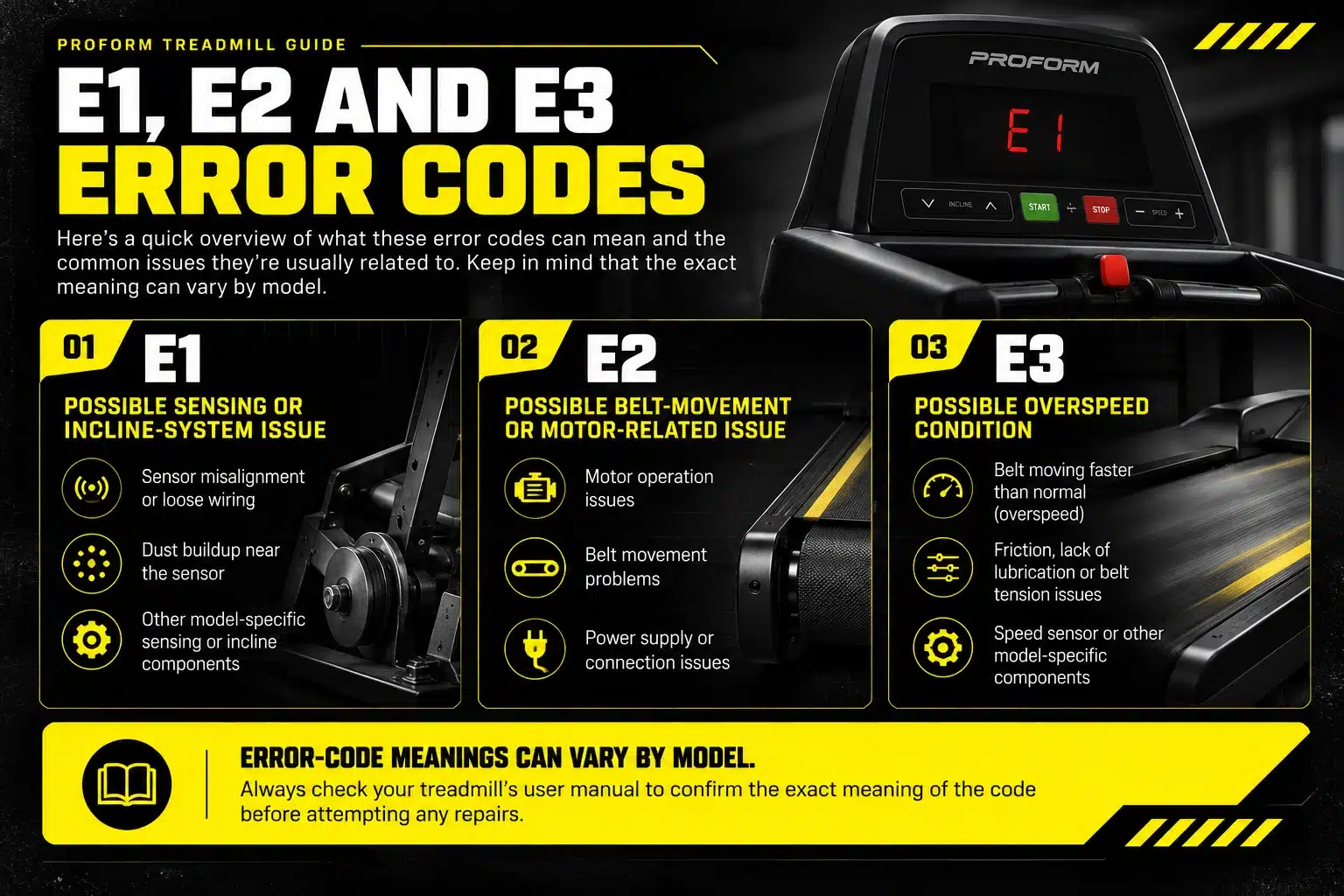
A ProForm treadmill E1 error can indicate a problem with the treadmill’s sensing system or another component, depending on the model. If the error is related to the speed sensor, possible causes include sensor misalignment, loose wiring, or dust buildup near the sensor. These issues can interfere with accurate speed detection and affect normal treadmill operation. Check your treadmill’s user manual to confirm the meaning of the E1 code before attempting any repairs. Also note when the error appears, such as during startup or while the belt is moving, as this information may help identify the appropriate troubleshooting procedure.
How to Fix the E1 Error
If your ProForm treadmill displays an E1 error, a few basic checks may help you identify the issue. Before attempting any repairs, confirm what the error means for your specific treadmill model and follow the manufacturer’s recommended troubleshooting procedure.
-
Turn off and unplug the treadmill: Switch off the machine, remove the safety key if applicable, and disconnect it from the power outlet before carrying out any checks.
-
Check for visible dust or debris: Inspect accessible areas around the treadmill for dust or obstructions. Do not open the motor cover unless the manufacturer’s instructions permit it and you can do so safely.
-
Check the model-specific sensor instructions: If your user manual identifies E1 as a speed-sensor issue, follow its guidance for checking the sensor’s position and detection area.
-
Check the error after restarting: Reconnect the treadmill and follow the manufacturer’s startup procedure. If the E1 error returns, avoid repeated resets or continued use.
-
Contact a qualified technician: Persistent errors may require inspection of the sensor, wiring, incline system, or another component, depending on the treadmill model.
If the E1 error persists after these basic checks, avoid adjusting internal components without confirming the correct procedure for your treadmill model. The issue may require a closer inspection of the speed sensor, incline system, or another component. Consult your user manual or contact a qualified treadmill technician to identify the cause and prevent further damage.
What Is an E2 Error on a ProForm Treadmill?
A ProForm treadmill E2 error can indicate a problem with motor operation or belt movement, depending on the treadmill model. Possible causes may include a motor-related fault, a power supply issue, or the treadmill failing to detect the expected belt movement. The exact meaning of E2 varies by model, so consult your treadmill’s user manual before attempting troubleshooting or replacing any components.
How to Fix the E2 Error
If your ProForm treadmill displays an E2 error, start with these basic checks before attempting any repairs. Since the meaning of E2 can vary by model, follow the troubleshooting instructions in your treadmill’s user manual.
-
Turn off and unplug the treadmill. Disconnect it from the power outlet before carrying out any checks.
-
Wait a few minutes. Allow the treadmill to power down completely before reconnecting it.
-
Check the power connection. Make sure the power cord is securely connected to a suitable wall outlet.
-
Avoid extension cords and power strips if your treadmill’s manual recommends connecting it directly to a wall outlet.
-
Check for visible damage. Look for obvious damage to the power cord or plug. Do not use the treadmill if either is damaged.
-
Restart according to the manual. Reconnect the treadmill and follow the manufacturer’s startup procedure.
-
Seek professional assistance if the error persists. A technician can determine whether the issue involves the motor, belt movement, wiring, or another component.
If the E2 error remains after these basic checks, avoid repeatedly resetting the treadmill or opening its motor compartment. Consult your model’s user manual or contact a qualified treadmill technician to diagnose the problem safely. For help with other common issues, including a treadmill that won’t start, unusual noises, or a slipping belt, read our treadmill troubleshooting guide.
What Is an E3 Error on a ProForm Treadmill?
A ProForm treadmill E3 error may indicate an overspeed condition on certain models, meaning the walking belt is moving faster than the console expects. Possible causes include excessive belt friction, insufficient lubrication, incorrect belt tension, or a speed-sensing issue. Since E3 error codes can vary by model, check your treadmill’s user manual to confirm the cause before attempting repairs.
How to Fix the E3 Error
If your treadmill’s manual confirms an E3 belt-speed error, follow these troubleshooting steps to check for common belt-related problems safely.
-
Check the walking belt: Turn off and unplug the treadmill before inspecting the belt for visible damage, rubbing, or signs of excessive friction.
-
Check belt lubrication: If the belt appears dry, consult the manufacturer’s instructions to determine whether lubrication is required and which lubricant is suitable for your model.
-
Inspect belt tension: Look for obvious signs that the belt is slipping or excessively tight. Adjust the rear roller bolts only if your user manual provides the correct procedure.
-
Check the speed-sensor guidance: If the manual identifies the sensor as a possible cause, follow the model-specific instructions or ask a qualified technician to inspect it.
-
Restart and test carefully: Reconnect the treadmill and follow the recommended startup procedure. If the error persists, stop using the machine and seek professional assistance.
Proper treadmill maintenance helps reduce belt friction and unnecessary strain on the motor. However, if the E3 error continues after the recommended checks, do not assume lubrication or belt adjustment will solve the problem. Consult your model’s manual or contact a qualified technician to identify the underlying cause.
Quick Reset Method (Try This First)
Before inspecting any internal components, try restarting your ProForm treadmill to rule out a temporary electronic issue. This simple reset may help, but it will not resolve every error code or underlying mechanical problem.
Reset Steps
- Turn off the treadmill.
- Unplug it from the power outlet.
- Wait for at least 5 minutes.
- Plug the treadmill back in.
- Restart the machine.
If the error disappears after restarting, monitor the treadmill during its next use. If the error returns, consult your model’s user manual to identify the correct troubleshooting procedure. Avoid repeatedly resetting the machine without investigating a persistent problem.
How to Prevent E1, E2, and E3 Errors
Regular maintenance can help keep your ProForm treadmill running smoothly and reduce the risk of belt-related problems. Follow these maintenance tips to keep your treadmill in good condition:
-
Lubricate the walking belt when needed: Check your user manual for the recommended lubrication schedule and the correct treadmill lubricant. Avoid over-lubricating the belt. For more detailed guidance on cleaning, lubrication, and routine upkeep, read our treadmill care and maintenance tips.
-
Keep the treadmill clean: Turn off and unplug the machine before cleaning. Remove dust and debris from accessible areas, and follow the manufacturer’s instructions for cleaning around the motor compartment.
-
Check belt alignment and tension: Look for signs that the walking belt is slipping, rubbing against the sides, or moving unevenly. Make adjustments only according to your model’s instructions.
-
Use a suitable power connection: Follow the manufacturer’s electrical requirements and use the recommended outlet arrangement. Avoid using damaged power cords or plugs.
-
Stay within the recommended weight limit: Check your treadmill’s maximum user weight in the product specifications or user manual. Exceeding this limit can place additional strain on the machine.
-
Inspect the treadmill regularly: Look for visible wear, unusual noises, or changes in belt movement. Stop using the treadmill if you notice a persistent problem and arrange professional inspection when necessary.
Following these maintenance practices can help reduce unnecessary wear and identify potential problems early. However, if an E1, E2, or E3 error appears, check your specific model’s manual because error-code meanings and troubleshooting procedures can vary between ProForm treadmills.
Treadmill mein error code aa jaye to pehle kya karein?
If your treadmill shows an error code, stop walking, hold the handrails and step onto the side rails. Press stop, remove the safety key, switch off the machine and unplug it before you check anything.
Note the code on the display, then check the power cord and wall outlet. Try the quick reset below once. If you smell burning, see damaged wiring or the error returns, stop using the treadmill and call a qualified technician.
Get Your ProForm Treadmill Running Again
ProForm treadmill E1, E2, and E3 errors can have different causes depending on the model. Start with basic checks, follow the troubleshooting instructions in your user manual, and avoid adjusting internal components without the correct guidance. If the error continues after the recommended steps, contact a qualified technician to diagnose the problem safely. Regular maintenance can also help keep your treadmill in good working condition.
Frequently Asked Questions
1. What Does an E1 Error Mean on a ProForm Treadmill?
An E1 error may indicate a speed-sensing or communication problem, depending on the model. Check your treadmill’s user manual to confirm the cause before troubleshooting.
2. What Does an E2 Error Mean on a ProForm Treadmill?
An E2 error may relate to motor operation, power supply, or belt movement. The exact meaning varies by model, so consult the manufacturer’s troubleshooting instructions.
3. How Do I Fix an E3 Error on a ProForm Treadmill?
If E3 indicates a belt-speed problem on your model, check for excessive belt friction, lubrication issues, or sensor problems. Unplug the treadmill before inspection and follow the manual’s recommended procedures.
4. How Do I Reset an E1 Error on a ProForm Treadmill?
Turn off the treadmill, remove the safety key if applicable, and unplug the machine. Wait before reconnecting it, then follow the startup procedure in your model’s user manual. If the E1 error appears again, check the manual for model-specific troubleshooting instructions or contact a qualified technician. A reset may not resolve an underlying sensor, incline-system, or other component issue.
5. When Should I Call a Treadmill Technician?
Contact a qualified technician if the error persists after basic troubleshooting, the treadmill stops unexpectedly, or you notice unusual noises, damaged wiring, or belt movement problems. Avoid opening internal components or attempting electrical repairs without proper expertise.